• To anyone looking to acquire commercial radio programming software:

    Please do not make requests for copies of radio programming software which is sold (or was sold) by the manufacturer for any monetary value. All requests will be deleted and a forum infraction issued. Making a request such as this is attempting to engage in software piracy and this forum cannot be involved or associated with this activity. The same goes for any private transaction via Private Message. Even if you attempt to engage in this activity in PM's we will still enforce the forum rules. Your PM's are not private and the administration has the right to read them if there's a hint to criminal activity.

    If you are having trouble legally obtaining software please state so. We do not want any hurt feelings when your vague post is mistaken for a free request. It is YOUR responsibility to properly word your request.

    To obtain Motorola software see the Sticky in the Motorola forum.

    The various other vendors often permit their dealers to sell the software online (i.e., Kenwood). Please use Google or some other search engine to find a dealer that sells the software. Typically each series or individual radio requires its own software package. Often the Kenwood software is less than $100 so don't be a cheapskate; just purchase it.

    For M/A Com/Harris/GE, etc: there are two software packages that program all current and past radios. One package is for conventional programming and the other for trunked programming. The trunked package is in upwards of $2,500. The conventional package is more reasonable though is still several hundred dollars. The benefit is you do not need multiple versions for each radio (unlike Motorola).

    This is a large and very visible forum. We cannot jeopardize the ability to provide the RadioReference services by allowing this activity to occur. Please respect this.

Anytone Programming Btech dmr 6x2 pro

crazymays77

Member
Joined
Jan 24, 2023
Messages
28
Reaction score
-2
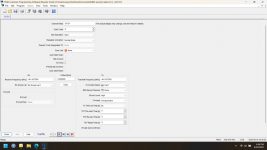
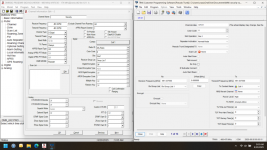
Here is the two titan radio channels we use. The other picture is all the options for that radio not sure if I need to look into any of them and do anything to the btech radio or not. The titan programming software is free I can provide a link to it if needed
 

Attachments

  • Screenshot 2025-08-19 163939.png
    Screenshot 2025-08-19 163939.png
    107.1 KB · Views: 20
  • Screenshot 2025-08-19 163903.png
    Screenshot 2025-08-19 163903.png
    107.2 KB · Views: 20
  • Screenshot 2025-08-19 164344.png
    Screenshot 2025-08-19 164344.png
    88 KB · Views: 20

crazymays77

Member
Joined
Jan 24, 2023
Messages
28
Reaction score
-2
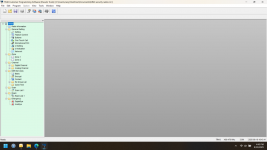
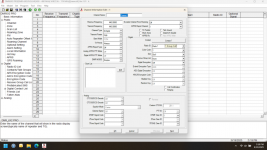
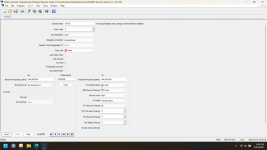
Here is what the btech programming looks like.
 

Attachments

  • Screenshot 2025-08-19 171910.png
    Screenshot 2025-08-19 171910.png
    212.3 KB · Views: 7

buddrousa

Member
Premium Subscriber
Joined
Jan 5, 2003
Messages
13,799
Reaction score
9,395
Location
Retired 40 Year Firefighter NW Tenn
Looking at picture 1 and 2 both I see RX Group List 1.
Did you find that in the Original Radio Software?
Did you create that same list in your BTech Software and Radio?
 

crazymays77

Member
Joined
Jan 24, 2023
Messages
28
Reaction score
-2
Looking at picture 1 and 2 both I see RX Group List 1.
Did you find that in the Original Radio Software?
Did you create that same list in your BTech Software and Radio?
I wamt to say yes but ill check tomorrow night. Ill download from my radio and post screenshots.
 

K9KLC

Member
Premium Subscriber
Joined
Mar 31, 2007
Messages
2,182
Reaction score
2,187
Location
Southwest, IL
Frequencies are not the same between the two radios. I wish I was more familiar with the titan radio programming, am I missing a way to add contacts in that thing? But to start with the frequencies aren't the same. Also the color codes are not the same, Color code is like a PL tone in the analog world. in the Titan it's 0 and in the BTech it's 1.
Did you download that directly and not change anything?
 

K9KLC

Member
Premium Subscriber
Joined
Mar 31, 2007
Messages
2,182
Reaction score
2,187
Location
Southwest, IL
Also the titan radios are set to transmit and receive on the same frequencies on both channels although, that's a common UHF repeater split between CH 1 and CH 2 (odd they'd do that to me). Are you sure you guys go thru a repeater? or am I looking at the screen shots wrong?
 

crazymays77

Member
Joined
Jan 24, 2023
Messages
28
Reaction score
-2
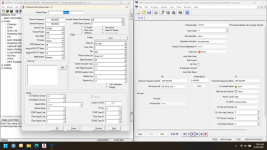
Here they are side by side for both radios.
 

Attachments

  • Screenshot 2025-08-20 050606.png
    Screenshot 2025-08-20 050606.png
    224.5 KB · Views: 14
  • Screenshot 2025-08-20 050518.png
    Screenshot 2025-08-20 050518.png
    224.3 KB · Views: 13

crazymays77

Member
Joined
Jan 24, 2023
Messages
28
Reaction score
-2
Frequencies are not the same between the two radios. I wish I was more familiar with the titan radio programming, am I missing a way to add contacts in that thing? But to start with the frequencies aren't the same. Also the color codes are not the same, Color code is like a PL tone in the analog world. in the Titan it's 0 and in the BTech it's 1.
Did you download that directly and not change anything?
that was just a screenshot of the layout for the btech radio. I just posted pics of side by side screenshots of the titan channel and then what i entered into the btech for the channel. sorry for the confusion
 

crazymays77

Member
Joined
Jan 24, 2023
Messages
28
Reaction score
-2
Also the titan radios are set to transmit and receive on the same frequencies on both channels although, that's a common UHF repeater split between CH 1 and CH 2 (odd they'd do that to me). Are you sure you guys go thru a repeater? or am I looking at the screen shots wrong?
I dont think it goes thru any repeaters.
 

K9KLC

Member
Premium Subscriber
Joined
Mar 31, 2007
Messages
2,182
Reaction score
2,187
Location
Southwest, IL
I was doing repeater
you said this in post 14...

To be of help we probably need screenshots of what you're actually doing. While I appreciate the layout of the BTech, What we need to see if actual programming to be of any assistance. I can only tell you we set up radios to talk on DMR and on simplex (one radio to the other) if you have both radios programmed the same and correctly, they'll talk to each other. We've done TYT, Anytone, Motorola, Alinco and they've all worked fine together. If you enter encryption into the mix then that's possibly an issue but, for standard DMR radio to radio, they've all talked to each other fine.
 

crazymays77

Member
Joined
Jan 24, 2023
Messages
28
Reaction score
-2
you said this in post 14...

To be of help we probably need screenshots of what you're actually doing. While I appreciate the layout of the BTech, What we need to see if actual programming to be of any assistance. I can only tell you we set up radios to talk on DMR and on simplex (one radio to the other) if you have both radios programmed the same and correctly, they'll talk to each other. We've done TYT, Anytone, Motorola, Alinco and they've all worked fine together. If you enter encryption into the mix then that's possibly an issue but, for standard DMR radio to radio, they've all talked to each other fine.
I put screenshots of both radios above how I had them set up. So im guessing i should have selected simplex instead of repeater.
 

K9KLC

Member
Premium Subscriber
Joined
Mar 31, 2007
Messages
2,182
Reaction score
2,187
Location
Southwest, IL
Where are you setting the talk group numbers? I I think in the titan it's "TX contact name". There should be a contact list somewhere where that is a number and then you assign that a name? I can';t help but think this is a talk group malfunction somehow since you're seeing carrier and not hearing audio.
 

K9KLC

Member
Premium Subscriber
Joined
Mar 31, 2007
Messages
2,182
Reaction score
2,187
Location
Southwest, IL
I'll get out my Anytone programming this evening if you don't sort this out by then, I haven't programmed that in years now, and don't remember where it's at on the Anytone I have. Btech is made by Anytone (as are the Alincos we've done) and I'll have to see where to set that contact list up I honestly don't remember.

Bottom line is, for two radios to talk to each other on DMR you need
Transmit frequency
Receive frequency
Color code
Time slot
Talk group number It's an actual number and you give it a name when you put it in the CPS (contact either usually called either group or private).
All of those have to be correct (match) for the radio to work.
 

crazymays77

Member
Joined
Jan 24, 2023
Messages
28
Reaction score
-2
I'll get out my Anytone programming this evening if you don't sort this out by then, I haven't programmed that in years now, and don't remember where it's at on the Anytone I have. Btech is made by Anytone (as are the Alincos we've done) and I'll have to see where to set that contact list up I honestly don't remember.

Bottom line is, for two radios to talk to each other on DMR you need
Transmit frequency
Receive frequency
Color code
Time slot
Talk group number It's an actual number and you give it a name when you put it in the CPS (contact either usually called either group or private).
All of those have to be correct (match) for the radio to work.
Ok ill look at it tonight. Only thing is incant test anything till our next event or I get a titan radio which defeats this whole thing. Thanks for the info and ill check tonight
 

buddrousa

Member
Premium Subscriber
Joined
Jan 5, 2003
Messages
13,799
Reaction score
9,395
Location
Retired 40 Year Firefighter NW Tenn
You still have to setup Talkgroups as I posted before for DMR to work you need.
1.Frequency to match
2. Color Code to match
3. Talkgroups to match
Do you know who programmed the working radios? If you do you would help you to get them to help you.
 

K9KLC

Member
Premium Subscriber
Joined
Mar 31, 2007
Messages
2,182
Reaction score
2,187
Location
Southwest, IL
Do you know who programmed the working radios? If you do you would help you to get them to help you.
This is great advice. Even someone not necessarily familiar with any particular CPS may be able to pick around in the Btech CPS and get it programmed. What's needed is a good knowledge of programming DMR, not necessarily each individual CPS.
 

chief21

Member
Premium Subscriber
Joined
Mar 2, 2004
Messages
2,025
Reaction score
743
Location
Western NC (Summer); Tampa Bay FL (Winter)
So im guessing i should have selected simplex instead of repeater.
That appears to be the case. Instead of "Repeater", set DMR MODE to "DMO/simplex". If that is not how it appears in your CPS, just look for "simplex".
Also, (and this is critical), confirm that your "Call 1" talkgroup actually uses the same Talkgroup ID as the "Call 1" talkgroup in the Titan radios. We can't tell that from your photos.
 

crazymays77

Member
Joined
Jan 24, 2023
Messages
28
Reaction score
-2
That appears to be the case. Instead of "Repeater", set DMR MODE to "DMO/simplex". If that is not how it appears in your CPS, just look for "simplex".
Also, (and this is critical), confirm that your "Call 1" talkgroup actually uses the same Talkgroup ID as the "Call 1" talkgroup in the Titan radios. We can't tell that from your photos.
Ok ill look into this but I don't have a titan radio to test it out with is the only problem.
 
Top