SDRTrunk SDRtrunk error message

Status
Not open for further replies.

n1riw

Member
Premium Subscriber
Joined
Jan 11, 2003
Messages
125
Reaction score
14
Location
Provincetown, MA
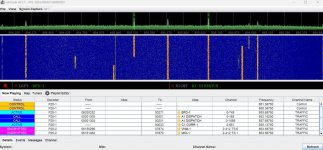
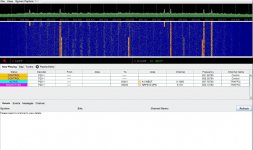
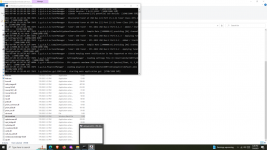
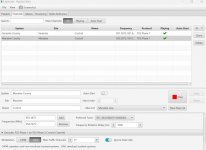
I am running SDR trunk on Windows 11. Recently the Manatee system switched control channel. I added that alternate channel into playlist (attached). Since this everything is working but I get periodic error messages (attached). There are two dongles assigned to this system with frequencies from 854.7375 to 859.4875.
As I said it works but I don't understand why it is looking for that alt ctrl channel when the main one is going fine. Thank you.
bandicam 2023-04-24 18-21-52-157.jpgbandicam 2023-04-24 18-22-13-767.jpg
 

n1riw

Member
Premium Subscriber
Joined
Jan 11, 2003
Messages
125
Reaction score
14
Location
Provincetown, MA
Please note the Sarasota zone has alt ctrl and does not generate this error message. Thank you
 

DSheirer

Member
Joined
Feb 15, 2010
Messages
628
Reaction score
174
Location
Fulton, NY
The alternate control channel frequency, when not in use, could be (temporarily) used as a traffic channel when allocated from the primary control channel.
 

maus92

Member
Premium Subscriber
Joined
Jun 23, 2004
Messages
8,660
Reaction score
2,480
Location
OCMD
Could it be that 854.7375 out-of-bandwidth range of the preferred SDR device? Hard to tell without seeing the Tuners tab.
 

n1riw

Member
Premium Subscriber
Joined
Jan 11, 2003
Messages
125
Reaction score
14
Location
Provincetown, MA
I think this is the screenshot you wanted...the frequencies on that zone run from 854.3375 to 859.7875. Slightly more that 5 mhz (2 1/2 per tuner) so I was wondering about a 3rd one? although I don't appear to be missing voice traffic.)bandicam 2023-04-25 13-41-22-282.jpg
 

dave3825

* * * * * * * * * * * *
Premium Subscriber
Joined
Feb 17, 2003
Messages
10,076
Reaction score
5,652
Location
Suffolk County NY
That's the now playing tab. Take a screenshot while in the tuners tab. Take a shot for each dongle.
 

n1riw

Member
Premium Subscriber
Joined
Jan 11, 2003
Messages
125
Reaction score
14
Location
Provincetown, MA
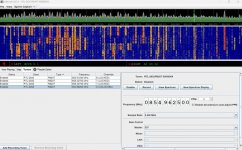
This is the tuner table...I added a 3rd dongle for Manatee to see what would happen...so 1 is Sarasota, and 2-4 are Manatee...I noted 3 switches from locked to unlocked while 4 is always unlocked...so I really don't need that 3rd dongle if it was already working and just ignore the error message?
 

Attachments

  • bandicam 2023-04-25 14-41-58-582.jpg
    bandicam 2023-04-25 14-41-58-582.jpg
    158.6 KB · Views: 34

n1riw

Member
Premium Subscriber
Joined
Jan 11, 2003
Messages
125
Reaction score
14
Location
Provincetown, MA
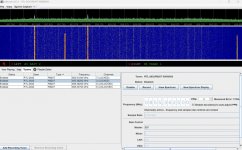
The other photos
 

Attachments

  • bandicam 2023-04-25 14-45-07-676.jpg
    bandicam 2023-04-25 14-45-07-676.jpg
    140 KB · Views: 29
  • bandicam 2023-04-25 14-45-13-876.jpg
    bandicam 2023-04-25 14-45-13-876.jpg
    139.1 KB · Views: 30

maus92

Member
Premium Subscriber
Joined
Jun 23, 2004
Messages
8,660
Reaction score
2,480
Location
OCMD
This is the tuner table...I added a 3rd dongle for Manatee to see what would happen...so 1 is Sarasota, and 2-4 are Manatee...I noted 3 switches from locked to unlocked while 4 is always unlocked...so I really don't need that 3rd dongle if it was already working and just ignore the error message?
This screenshot is a hot mess; the later two are what you should be seeing. Noise floor is high.
 

maus92

Member
Premium Subscriber
Joined
Jun 23, 2004
Messages
8,660
Reaction score
2,480
Location
OCMD
The other photos
I believe what is happening is
Weird because all three are using same antenna
Could be a bad SDR.

I'm thinking that your SDRs are retuning based on traffic, and at the time the program wanted to access 854.7375, there was no SDR covering that range. I use an Airspy, thus I don't have the bandwidth issue, but I believe there has been discussion about how to configure / trick the program by padding the control channel list. Unfortunately, I don't remember that trick since I don't use multiple RTL-SDRs.
 

n1riw

Member
Premium Subscriber
Joined
Jan 11, 2003
Messages
125
Reaction score
14
Location
Provincetown, MA
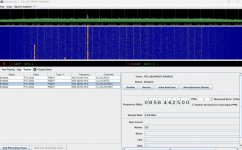
The 3rd one looks better now...and no error message since I added it...
 

Attachments

  • bandicam 2023-04-25 22-15-15-587.jpg
    bandicam 2023-04-25 22-15-15-587.jpg
    126.3 KB · Views: 16

mike341

Member
Premium Subscriber
Joined
Dec 30, 2022
Messages
8
Reaction score
2
Location
KISSIMMEE, FL
Hi Everyone, I'm trying to run SDR trunk but when it starts up and tries to run the GUI application, the screen will not populate the GUI data.
I'm running windows 10.1688931516232.png
 

maus92

Member
Premium Subscriber
Joined
Jun 23, 2004
Messages
8,660
Reaction score
2,480
Location
OCMD
The view you posted shows an incomplete log. The log can be found under View | Logs and Recordings | Logs | sdrtrunk_app.log . Change the .log to .txt and it attach to a post. Did you run CPU calibrations? Create the JMBE library? Can't tell from the view you attached initially.
 

maus92

Member
Premium Subscriber
Joined
Jun 23, 2004
Messages
8,660
Reaction score
2,480
Location
OCMD
I can't access the GUI to do anything. The GUI page is blank
You don't need the GUI to access the logs. You can also find the logs within the Windows file structure. It looks like you are running the program from the Downloads directory - not good practice. Assuming that you have extracted / unzipped the download file, SDRTrunk creates a directory structure within its "home" directory. You should find the folder that contains the log file.
 

mike341

Member
Premium Subscriber
Joined
Dec 30, 2022
Messages
8
Reaction score
2
Location
KISSIMMEE, FL
The view you posted shows an incomplete log. The log can be found under View | Logs and Recordings | Logs | sdrtrunk_app.log . Change the .log to .txt and it attach to a post. Did you run CPU calibrations? Create the JMBE library? Can't tell from the view you attached initially.
Hi Maus92, Thank you for your Help. I,ve attached the log file for sdr trunk.
 

Attachments

  • sdrtrunk_app.zip
    4 KB · Views: 9

maus92

Member
Premium Subscriber
Joined
Jun 23, 2004
Messages
8,660
Reaction score
2,480
Location
OCMD
Hi Maus92, Do you have any updates on when SDR SHARP will be fixed? I'v tried all the trouble shooting ideas but it still crashes
I have no idea about SDR#.
 

ToddWilkinson

ScanMN
Joined
Dec 2, 2021
Messages
335
Reaction score
105
I am running SDR trunk on Windows 11. Recently the Manatee system switched control channel. I added that alternate channel into playlist (attached). Since this everything is working but I get periodic error messages (attached). There are two dongles assigned to this system with frequencies from 854.7375 to 859.4875.
As I said it works but I don't understand why it is looking for that alt ctrl channel when the main one is going fine. Thank you.
View attachment 140671View attachment 140672
Use the Control channel no alternates, give it 10 voice channels in settings, turn LSM off!
 
Status
Not open for further replies.
Top