Sentinel: Sentinel Database Save Config error

Status
Not open for further replies.

adminsidus

Member
Joined
Nov 22, 2024
Messages
7
Reaction score
0
Good morning,

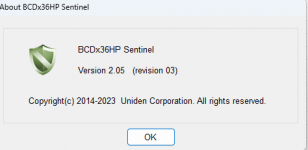
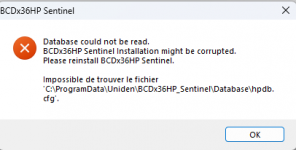
I had to change my PC and when I installed sentinel again and downloaded the content from my SDS200 nothing happened.

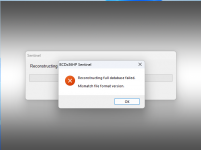
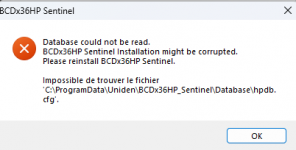
Still a corruption and version error. I deleted the software 4 times as well as les.cab the last time and it was a failure.

I even tried last time to create a new profile and rewrite the contents of my favorites list....... negative, when I open the software, the error message.

Anyone have any ideas, I'm on Windows 11.

Sorry, for my English it's not my first language and the online translation is sometimes worse. :)
 

Attachments

  • 20241122110327.png
    20241122110327.png
    11.3 KB · Views: 24
  • 20241122104738.png
    20241122104738.png
    13.5 KB · Views: 22

adminsidus

Member
Joined
Nov 22, 2024
Messages
7
Reaction score
0
Lock this message error for version error
 

Attachments

  • 20241122125014.png
    20241122125014.png
    193.6 KB · Views: 29

adminsidus

Member
Joined
Nov 22, 2024
Messages
7
Reaction score
0
Hello,

I tried again and nothing happened.

I installed the software that someone offered me for $50 US which means $75 for me in addition which is far from user frendly.

Sentinel is an Open GL.

Possible for someone to take their file named hpdb.cfg into their software and at worst I will try to overwrite my file. He who tries nothing, gets nothing.

THANKS
 

Attachments

  • hpdbcfg.png
    hpdbcfg.png
    11.3 KB · Views: 9

ProScan

Software Provider
Premium Subscriber
Joined
Jul 2, 2006
Messages
8,445
Reaction score
4,957
Location
Ontario, Calif.
@adminsidus
Do this:
1. Stop Sentinel
2. Navigate to this folder using the File Explorer ->>> C:\ProgramData\Uniden\BCDx36HP_Sentinel\Database
3. Delete all the files in that folder
4. Restart Sentinel. A message will appear "Reconstructing Full Database"
Sentinel corruption problem should be gone.
 

adminsidus

Member
Joined
Nov 22, 2024
Messages
7
Reaction score
0
@adminsidus
Do this:
1. Stop Sentinel
2. Navigate to this folder using the File Explorer ->>> C:\ProgramData\Uniden\BCDx36HP_Sentinel\Database
3. Delete all the files in that folder
4. Restart Sentinel. A message will appear "Reconstructing Full Database"
Sentinel corruption problem should be gone.
Yep, turn on all view folder and files option and delete and programdata ''uniden'' folder et install again and same **** again
 

nessnet

Member
Premium Subscriber
Joined
Jan 22, 2007
Messages
2,177
Reaction score
1,671
Location
What month is it?
Lock on the top publication the link Proscan Pro Licence is $50 Is full Option sooo........... :-(

Your OP:
...."when I installed sentinel again".....
You certainly were not clear that you were talking about ProScan in that (#5) post.

Many of us here use ProScan - great program, great support (thanks Bob).
 
Status
Not open for further replies.
Top