BCD325P2/BCD996P2: Battery Life

EAFrizzle

Bond. Ward Bond
Premium Subscriber
Joined
Jun 2, 2019
Messages
1,210
Reaction score
1,788
Location
SE de DFW
Can I charge the rechargable batteries using a power bank?

Yes, you can, but it brings up the same problem because it's charging in the radio.

Devices that can charge their own batteries tend to be a simple trickle charger. There's no temperature sensing or current adjustment to the charger; it's  X voltage at  Y amperage for however long the charger runs. Best to use the power bank just for power while running.
 

brcoz

Member
Premium Subscriber
Joined
Feb 23, 2007
Messages
151
Reaction score
30
Location
Florence, AZ
I am using then same OPUS charger. $47.96 on Ama-of-the-zon

I never charge the batteries in the scanner. I have used a battery power bank to run the scanner only.
 

hill

Member
Premium Subscriber
Joined
Dec 19, 2002
Messages
2,177
Reaction score
1,461
Location
Middle River, MD
Can I charge the rechargable batteries using a power bank?

I would just use the power bank to run the scanner when other batteries are dead.

Kind of waste of the power bank to use it to recharge the batteries.

As stated many times never charge batteries in the scanner. It's just a timed circuit and doesn't monitor the voltage of batteries to shut off when then are fully charged. Plus the charging circuit in scanner causes batteries to have shorter life spans.

And the reason to not to charge batteries in the scanner. If something happens and batteries melt/explode it will destroy your scanner. Plenty of information on web of all kind of batteries causing issues and fires.
 
Last edited:

wtp

Member
Joined
Apr 3, 2008
Messages
7,267
Reaction score
2,998
Location
Port Charlotte FL
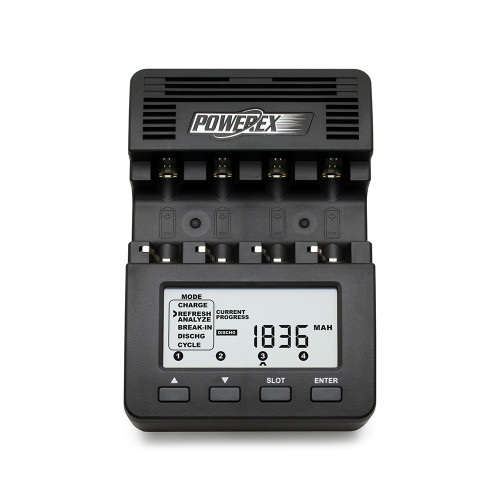
get a good external charger, one that can tell you the true capacity of each cell.
the other thing to do is to "pair up" the cells.
i have about a dozen cells and marker the side with the capacity. i then use the closest pair for a longer run time.
the other thing i do is to take two extra batteries with my when going out. not in the pocket with the keys.
to try and not sell something, this is discontinued, but it is/was great.
 
Last edited:

benlichtenfeld

Member
Premium Subscriber
Joined
Jul 15, 2023
Messages
16
Reaction score
4
Location
Dublin, OH
get a good external charger, one that can tell you the true capacity of each cell.
the other thing to do is to "pair up" the cells.
i have about a dozen cells and marker the side with the capacity. i then use the closest pair for a longer run time.
the other thing i do is to take two extra batteries with my when going out. not in the pocket with the keys.
to try and not sell something, this is discontinued, but it is/was great.
Thanks, but why do you have a DOZEN cells? Seems excessive haha
 

EAFrizzle

Bond. Ward Bond
Premium Subscriber
Joined
Jun 2, 2019
Messages
1,210
Reaction score
1,788
Location
SE de DFW
I've got 2 dozen AAs, a dozen AAAs, a dozen 18650s, and 6 21700s. I use a lot of batteries on a day to day basis, and it has served me well during and after hurricanes.

Once you get used to keeping them conditioned properly, you realize they're pretty convenient.

@wtp made a good point about keeping batteries paired. Starting with new batteries and charger, that will give you the best capacity and longest life for the cells, especially when operating at high current draw. It also lets you know easily when a cell is starting to degrade.

Get a small 2 or 4 cell plastic case to carry spares; insulated and away from metal is the safest way to carry.
 

Pen_Man

Member
Premium Subscriber
Joined
Jul 30, 2022
Messages
11
Reaction score
2
Hello Newbie here.
I just purchased a BCD325P2 scanner and would just like to confirm the following:
The scanner will not scan (or receive) while it is on charge through the USB cable.
Thanks for your response in advance.
P
 

benlichtenfeld

Member
Premium Subscriber
Joined
Jul 15, 2023
Messages
16
Reaction score
4
Location
Dublin, OH
Hello Newbie here.
I just purchased a BCD325P2 scanner and would just like to confirm the following:
The scanner will not scan (or receive) while it is on charge through the USB cable.
Thanks for your response in advance.
P
That's correct. It's only possible to charge while off.
 

Pen_Man

Member
Premium Subscriber
Joined
Jul 30, 2022
Messages
11
Reaction score
2
Thanks Ben
I just answered my own question though. You can run the scanner on an external USB supply if you take the batteries out of the unit. (y)
 

hiegtx

Mentor
Premium Subscriber
Joined
May 8, 2004
Messages
11,978
Reaction score
4,365
Location
Dallas, TX
Thanks Ben
I just answered my own question though. You can run the scanner on an external USB supply if you take the batteries out of the unit. (y)
While you can remove the batteries, to be charged externally while using an external USB power supply (power 'brick like used for charging tablets and cellphones, or plugged into your car's lighter plug), the 325P2 operates with or without batteries.
 

Pen_Man

Member
Premium Subscriber
Joined
Jul 30, 2022
Messages
11
Reaction score
2
While you can remove the batteries, to be charged externally while using an external USB power supply (power 'brick like used for charging tablets and cellphones, or plugged into your car's lighter plug), the 325P2 operates with or without batteries.
The reason for my original question was that I noticed that if the batteries are installed AND external 5v is applied, the unit will not scan or receive.
 

EAFrizzle

Bond. Ward Bond
Premium Subscriber
Joined
Jun 2, 2019
Messages
1,210
Reaction score
1,788
Location
SE de DFW
The reason for my original question was that I noticed that if the batteries are installed AND external 5v is applied, the unit will not scan or receive.

That's not normal behavior. My 325 runs most days with a set of batteries inserted and power from the data cable while logging in ProScan. Not sure what could be causing that.
 

hiegtx

Mentor
Premium Subscriber
Joined
May 8, 2004
Messages
11,978
Reaction score
4,365
Location
Dallas, TX
The reason for my original question was that I noticed that if the batteries are installed AND external 5v is applied, the unit will not scan or receive.
It will scan & receive under those conditions. I have a 325P2, connected to my PC and ProScan, and being powered by the UPS of the PC, with batteries installed. If, when first connecting the UPS cable, and unit turned off, you say yes to 'start charging batteries', it will, at first show "normal charging" on the display. If you then lightly press the power on key, it will not start, instead still showing "Normal Charging". However, if you press and hold down the power button for a couple of seconds, the unit will then boot up and scan normally. Batteries will not be charging while scanning. But, if you then turn the scanner off via the power button, it will revert to displaying "Normal Charging" and charge batteries (as long as you don't power it back up to start scanning).
 
Last edited:
Top