
XPS720
Member
My PC had to be replaced by a new one and I lost the Sentinel program and it was a long time a go. Just how and where does it get down loaded. I use a BCD536HP and A SDS200. I will need to get ProScann also for each scanner.


It keeps telling me WIFI not connected even though it is?See this document Uniden BCD536HP Wi-Fi Stream and Remote Access Via Proscan Web Server
on setting up the 536 Wi-Fi. Ignore the Web Server part if not using the Web Server feature.
The 200 LAN setup is a little different. Start with going to the Settings menu then LAN Settings. See if you can take it from there.

Are you using the wifi usb dongle that came with the 536? Or just some other random adapter that works with your pc?It keeps telling me WIFI not connected even though it is?
I am on the one they gave me it says Uniden on it with a green light when I plug it into my PC's USB port.Are you using the wifi usb dongle that came with the 536? Or just some other random adapter that works with your pc?

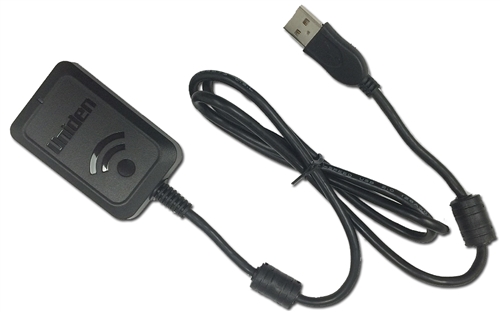

Yes I did plug it into the back next to speaker inputIs this what you have...
That plugs into the scanner not the PC...
Where did you plug it? There is no speaker input jack on back of scanner. Did you plug this into the usb on back of the 536?Yes I did plug it into the back next to speaker input
It is plugged in right where it says USB on photo.Where did you plug it? There is no speaker input jack on back of scanner. Did you plug this into the usb on back of the 536?


I know the set up as I had the program for many years. What I am trying to see when my 200 is plugged into my PC Bye USB Wire I dont see Comm Port at the top of my down load.Thats posted to show you where to select your 536... From the pull down in the first pic
That is my 200 settings... You need to set YOUR 536 up the same way...
Then why did you post this... In post #14...I know the set up as I had the program for many years.


ProScan will do the sameYes that was my SDS200 . Do I need to use Scanner LAN Player?
I want my SDS200 first on ProScann, also I lost my key purchase for the program, I will need to get a new key. I don't care I just was to see my scanners back on my PC monitor :-(ProScan will do the same
Where are you at and which scanner? I suggest doing one thing at a time so it doesn't get confusing.
Keys are handled via email.I want my SDS200 first on ProScann, also I lost my key purchase for the program, I will need to get a new key.
Are you using the serial port or the Wi-Fi/LAN methodI don't care I just was to see my scanners back on my PC monitor :-(


