I have tried decoding digital signals using dsd+ but i get no sound output even if input and output are set true i have tried using sdrpp sdr sharp with and without plugins three different computters and also didnt find information about this


You are using an out of date browser. It may not display this or other websites correctly.
You should upgrade or use an alternative browser.
You should upgrade or use an alternative browser.
No sound dsd+
- Status
- Not open for further replies.

Assuming you are using dsdplus101.
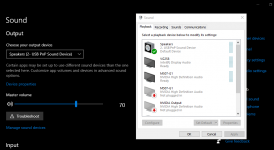
Windows Sound manager(recording tab) - make sure your output choice in sdr#/sdr++ is set as default there
Still no audio.. check windows microphone security permissions
Windows Sound manager(recording tab) - make sure your output choice in sdr#/sdr++ is set as default there
Still no audio.. check windows microphone security permissions

There's 2 different sound settings, one from the Control Panel and one in the Windows settings. Check 'em both:
What version of DSD+ are you running and how are you running / starting it? When you say "set true", what does that mean? If you created your own .bat file, show us the command line you're running.
What version of DSD+ are you running and how are you running / starting it? When you say "set true", what does that mean? If you created your own .bat file, show us the command line you're running.

im just running the .exe file i have not done anything using bat files and im using dsdplus 101
The EXE itself is not going to produce sound. You need an imput signal either from FMP/FMP24.exe or from an SDR program + Virtual Cable or from a discriminator tap.
And it's only going to produce sound when you are monitoring a digital frequency / system / site that DSDPlus can decode AND there is voice traffic.
You need a command line argument -i, such as -i1 or -i2 to tell DSD+ what the input audio device should be. So you can't just double-click on DSDPlus.exe. Instead, you need to run it from a command terminal or a .bat file with the command argument(s).

Reconrider
Inside the Galaxy
I would suggest reading the txt files in that folder. After that looking up youtube tutorials - that will be the best guidance so you can start and stop as you're going so you can follow along.
A Short run through
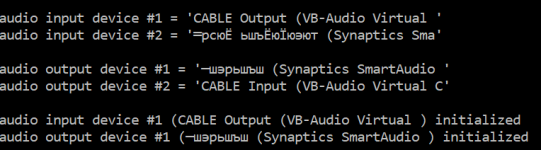
With sdr++ running like that can you show your dsdplus101 windows?I think its because of the russian language (im not russian but european)
That is p25 p1, you'll need two dongles with dsdplus101 (see trunking.txt)
Sdrtrunk with work with one dongle and track
dsdplus101 running the audio for your video, you will not get voice from p25 control channel

Sdrtrunk with work with one dongle and track
dsdplus101 running the audio for your video, you will not get voice from p25 control channel
- Status
- Not open for further replies.
Similar threads
- Replies
- 5
- Views
- 742

- Replies
- 23
- Views
- 1K

- Replies
- 2
- Views
- 456
- Replies
- 1
- Views
- 559