SDR# SDR# 1911 & rtl-sdr

Status
Not open for further replies.

PDXh0b0

Active Member
Premium Subscriber
Joined
Mar 31, 2020
Messages
993
Reaction score
707
Location
Woodland, WA
so I tried posting on groups.io, it vanished...

new release of sdr# version 1911

have tried 3 pc's with windows 10

downloaded, extracted, place the folder in C drive
ran the install-rtlsdr.bat
No plug-ins have been added
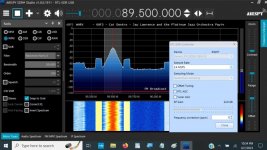
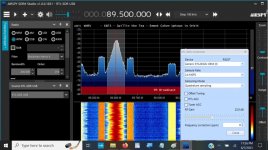
no problem making changes before pressing play
once I press Play, any action causes 1911 to crash example (changing frequency, gain ect.)
this is with blogv3,nesdr v4 & v5

basically I am wondering if anyone is experiencing the same results, or should I keep digging ... whats your experience with the new release using an rtl-sdr dongle
 

PDXh0b0

Active Member
Premium Subscriber
Joined
Mar 31, 2020
Messages
993
Reaction score
707
Location
Woodland, WA
I have the same problem with v1911. When I try to change the freq, it closes. When I reopen, the source is set back to airspyR2.
If you select source, make settings adjustments and than close sdr# it will save your settings...
 

rabbit108

Member
Joined
Jan 4, 2021
Messages
429
Reaction score
154
Location
S.E. VA
If you select source, make settings adjustments and than close sdr# it will save your settings...
If I make the settings adjustments in v1911 before I click on PLAY, it works. But if I try to change a setting of freq or RF gain during PLAY, it will close.
 

Attachments

  • v1911setB4Play2_1.jpg
    v1911setB4Play2_1.jpg
    103.8 KB · Views: 14

Skipwire

Newbie
Joined
Jun 16, 2022
Messages
4
Reaction score
13
Location
Oregon
Application: SDRSharp.exe
CoreCLR Version: 7.0.523.17405
.NET Version: 7.0.5
Description: The process was terminated due to an internal error in the .NET Runtime at IP 0x00D0CF80 (0x00BF0000) with exit code 0x80131506.

Faulting application name: SDRSharp.exe, version: 1.0.0.1912, time stamp: 0x641ddaa7
Faulting module name: SDRSharp.exe, version: 1.0.0.1912, time stamp: 0x641ddaa7
Exception code: 0x80131506
Fault offset: 0x0011cf80
Faulting process id: 0x0x32AC
Faulting application start time: 0x0x1D999B7ADA7928A
Faulting application path: C:\Users\XXX\Downloads\sdrsharp-x86\SDRSharp.exe
Faulting module path: C:\Users\XXX\Downloads\sdrsharp-x86\SDRSharp.exe
Report Id: 4cb7ed97-a1f8-413e-9888-3e432af91757
Faulting package full name:
Faulting package-relative application ID:

Ran SDR# sharp in both admin and non admin privledges with no change.

Update .Net 7.05 to fix the problem

Download .NET 7.0 (Linux, macOS, and Windows)

SDR# still broken after a few minutes after .Net update and a reboot.

Event Name: APPCRASH
Response: Not available
Cab Id: 0

Problem signature:
P1: SDRSharp.exe
P2: 1.0.0.1912
P3: 641ddaa7
P4: SDRSharp.exe
P5: 1.0.0.1912
P6: 641ddaa7
P7: 80131506
P8: 0011cf80
P9:
P10:
 

rabbit108

Member
Joined
Jan 4, 2021
Messages
429
Reaction score
154
Location
S.E. VA
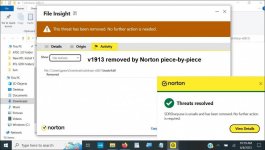
v1913 download removed by Norton piece-by-piece
 

Attachments

  • v1913removed by Norton_1.jpg
    v1913removed by Norton_1.jpg
    79.8 KB · Views: 18

MELERIX

Member
Joined
Nov 19, 2018
Messages
77
Reaction score
49
Last edited:

rabbit108

Member
Joined
Jan 4, 2021
Messages
429
Reaction score
154
Location
S.E. VA
yes, but that version is old, better use 1910, until they fix the issue.


these are just a false positive.
Probably true. Hope so.

I've seen it before. After enough people download a new version, it's considered safe.
 

mciupa

Canadian DB Admin
Moderator
Joined
Nov 5, 2002
Messages
8,884
Reaction score
2,314
Location
I'm here a lot
I agree with @MELERIX , I use v1910 solely with the TETRA plug-in on a busy dedicated TETRA channel and it works superb.
I admit though if I fuss with different frequencies it may shut down, hence the play and walk away.
 
Status
Not open for further replies.
Top