
"On second thought let's not go to
CamelotRR Forums, it's rather a silly place."


"On second thought let's not go to
CamelotRR Forums, it's rather a silly place."

I checked the code path here. -Y is conventional scan mode, not trunking scan mode. When -Y is parsed it enables scanner_mode and explicitly clears the trunking flags, so autosave later writes [trunking] enabled = false. -T -Y ends the same way because -Y wins when parsed last.I made a .ini file with chan_csv that points to the frequency list file.
If I start with -Y it finds the active CC but won't trunk track and sets [trunking] enabled = false in the .ini file.
-T -Y does the same thing.
-T trunk tracks but doesn't read the channel file. it only uses the specified rtl_freq.
Is there any way to make it scan for control channels and trunk track?
I am running into an issue where it runs well for probably 20 to 30 minutes and then one of two things happen.
1. Signal box turns blue, still shows a very useable SNR but doesn't decode the P25P1 control channel.
2. Signal box stays green, but SNR meter shows N/A.
Restarting the RTL stream from the menu can sometimes get it going again for a few minutes.
If this is a bug and not a screw up on my part, I'll move it over to github. I am running windows, so I'll need to figure out how to dump logging.
My config, monitoring a simulcast cell on 853.725. I could dial the gain down to 40 with a still useable SNR.
Code:version = 1 [input] source = "rtl" rtl_device = 0 rtl_freq = "853725000" rtl_gain = 49 rtl_ppm = 1 rtl_bw_khz = 48 rtl_sql = -120 rtl_volume = 3 auto_ppm = true [output] backend = "pulse" pulse_sink = "Headphones (Realtek USB2.0 Audi" ncurses_ui = true [mode] decode = "p25p1" demod = "qpsk" [trunking] enabled = true group_csv = "c:\mpscs.csv" allow_list = true tune_group_calls = true tune_private_calls = true tune_data_calls = false tune_enc_calls = false [logging] [alerts] enabled = false voice_start = true voice_end = true data = true [recording] per_call_wav = false per_call_wav_dir = "C:\RadioApps\dsdneo\calls" rdio_mode = "dirwatch" rdio_system_id = 1942 rdio_api_url = "http://127.0.0.1:3000" rdio_upload_timeout_ms = 5000 rdio_upload_retries = 1 rdio_api_delete_after_upload = false [dsp] iq_balance = false iq_dc_block = false
I think mine (Linux AppImage) also seems to quit decoding after a while.
I don't know how the terminal text colors work in Win 10/11. I don't remember if you can even change that. With my terminal text color palate when I start the program the top line is white (uncolored) and the rest is all dark cyan. Parts of it will turn green. I don't know what green indicates. Sometimes the green part will rapidly alternate green/cyan with garbled audio or no CC decode.
What is GFSK? I have never heard or seen that before. Is that supposed to be GMSK (gaussian minimim shift keying)? I thought the only thing that uses GMSK is D-Star.
I get GFSK with auto demod on some DMR, NEXEDGE and some P25. I thought DMR, Both NXDN, and P25 except for QPSK simulcast were all 4 level FSK which to me is C4FM. If I use -mc or demod = "c4fm" in the ini file it doesn't seem to work sometimes.

Nightly build has been running most of the day on my PC without issue. I think you found the problem.i've added several defensive measures to resolve this issue, you can try it in: https://github.com/arancormonk/dsd-...ightly/dsd-neo-msvc-x86_64-native-nightly.zip
realize this is a nightly build (latest of main branch), so other things may break. also, this branch uses the latest version of the mbelib-neo api, so the audio quality should improve... may be subjective, though.
Yes, there is a distinction. Omitting demod means “use the normal defaults/preset behavior,” while -ma or demod = "auto" explicitly enables the unlocked auto-candidate state. In practice I would usually omit it, and avoid -ma unless there’s a specific reason.Is there any difference between using -ma or demod = "auto" and not specifying a demod mode?

Hmmm, DSD-neo does accept tcp:<host>:<port> with numeric IPv4 addresses, and I added regression tests to make sure that stays covered. A x.x.x.1 class C address (assuming 255.255.255.0 subnet) sounds like your router? Possibly??? I went through the gyrations of trying to break this on Linux and I can't...Howdy.
I think I have uncovered a bug.
This command works 100% (In conjunction with SDR++):
bin\dsd-neo.exe -ft -f1 -i tcp:localhost:7355 -U 4532 -T -G group\group.csv -N 2> log\log.ans
But this command doesn't work as it doesn't connect (In conjunction with SDR++):
bin\dsd-neo.exe -ft -f1 -i tcp:192.168.1.1:7355 -U 4532 -T -G group\group.csv -N 2> log\log.ans
Both DSD-neo and SDR++ are on the same PC.
I want to use SDR++ on another PC on my network. This doesn't work either.
It doesn't work when I specify an IP address as per the help within DSD-neo.
ps. I am using SDR++ 1.3.0 and DSD-neo 2.0.1. I am running respective commands from a .bat file in the parent directory. Windows 10.
Also, works just fine using RTL.
Thanks.

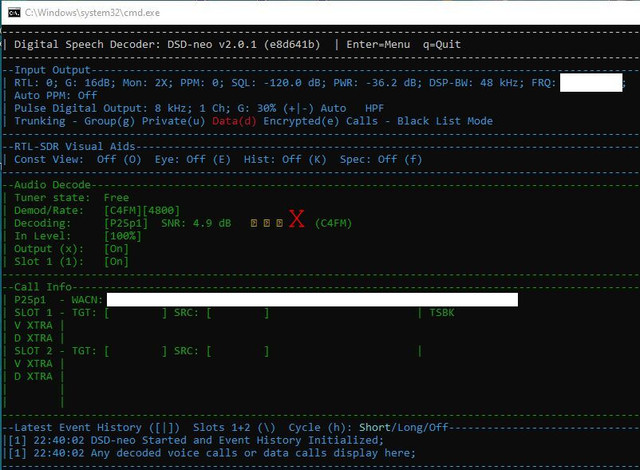
Ah, that means the font cmd picked on your machine doesn't have wide unicode support and my check failed to detect that... you can either pick a different cmd font (Terminal/Consolas/Cascadia Mono) or invoke dsd-neo with PowerShell instead, which I think should always have wide unicode support...maybe. I'm going to push a fix to actually fallback to ASCII when this happens.I also get bad symbols where the SNR meter should be (Se the red 'X') ?
i still have to add that back as a user forced runtime argument... the intention was to stop people from accidentally sharing public screenshots or logs with keys that should not be made public, but if i make it user explicit.. then that's your problem and not minehow can I make DSD-NEO to show the key in the consoles instead of text that says "[redacted]"
latest nightly build hashow can I make DSD-NEO to show the key in the consoles instead of text that says "[redacted]"
--show-keysYep, if you’re launching from a `.bat`, you’re in cmd unless the batch file explicitly starts PowerShell or Windows Terminal."Ah, that means the font cmd picked on your machine doesn't have wide unicode support and my check failed to detect that... you can either pick a different cmd font (Terminal/Consolas/Cascadia Mono) or invoke dsd-neo with PowerShell instead, which I think should always have wide unicode support...maybe. I'm going to push a fix to actually fallback to ASCII when this happens."
I run from a batch file. So that must be cmd (as in my screen shot).
So, I can run PowerShell and launch DSD-neo ? I will try that.
"pick a different cmd font (Terminal/Consolas/Cascadia Mono)"
May you please throw a dog a bone and explain how one does this ??
I use "mode con: cols=119 lines=64" first line of my .bat file. Can one specify font in this manner may be ?
I am after a hand up and not a hand out. Appreciate your time !
"I'm going to push a fix to actually fallback to ASCII when this happens."
I am pro that decision ! It would look better to new users and old users. -Good idea ! I don't mind awaiting new future (mainstream) release.
I don't mind spending a little time in beta testing. The least I can do
The networking bit. Appreciate your input there. I will have a look a little bit later and mull over what you advised (little bit technical). I am always willing to learn a bit more about networking.
For simplicity sake (in describing my set up), I have two PC 's. One with 8 SDR's (closer to my aerial) and another that I use with DSD-neo. Both PC's connected over LAN.
Also, I will check Firewall rules (Ports 7355 and 4532).
Love your work !


