ProScan

Software Provider
Premium Subscriber
Joined
Jul 2, 2006
Messages
8,441
Reaction score
4,952
Location
Ontario, Calif.
ProScan Version 1.7 Build 2 includes the RadioReference Imports feature, improved Scanner Over IP, and bug fixes.

Supported scanners are the BCD996T, BC796D, BC785D, BC780XLT, BC296D, and the BC250D.

I'm thriving to make this the best Computer Aided Scanning program and suggestions are very much appreciated.

http://www.proscan.org/index.htm

Bob
 

RF23

Member
Premium Subscriber
Joined
Aug 1, 2011
Messages
949
Reaction score
76
Channel Name with a consecutive Number - Sort Order

Under “Database Info”
“Number Tags”
Far right column “Channel Name”

I have noticed names with consecutive numbers are sorted by the first number then the second number and not by their decimal value.

For example:
FRS 1 to 14 is sorted:
FRS 1
FRS 10
FRS 11
FRS 12
FRS 13
FRS 14
FRS 2
FRS 3
.
.
.
FRS 9

This is using the default sort as originally presented (no user input).

Is there a reason for this?
 

Jay911

Silent Key (April 15th, 2023)
Joined
Feb 15, 2002
Messages
9,378
Reaction score
380
Location
Bragg Creek, Alberta
Just tried to import a bunch (~6500) of unit IDs into a P25 system. I used "Get Clipboard" to do this, and got this:

Qb6rEsI.png


What's wrong with the IDs from 5101 on down? Every ID right through to 16777215 is invalid according to ProScan. They import fine in Sentinel and are legitimate on the system.

I was in the Unit ID section of the system when I clicked Get Clipboard. I'd just deleted the old entries (nodes) in order to load the new ones.
 

ProScan

Software Provider
Premium Subscriber
Joined
Jul 2, 2006
Messages
8,441
Reaction score
4,952
Location
Ontario, Calif.
Under “Database Info”
“Number Tags”
Far right column “Channel Name”

I have noticed names with consecutive numbers are sorted by the first number then the second number and not by their decimal value.

For example:
FRS 1 to 14 is sorted:
FRS 1
FRS 10
FRS 11
FRS 12
FRS 13
FRS 14
FRS 2
FRS 3
.
.
.
FRS 9

This is using the default sort as originally presented (no user input).

Is there a reason for this?

Channel Names are sorted in alphabetical order and not numerical order.
 

jonwienke

More Info Coming Soon!
Joined
Jul 18, 2014
Messages
13,409
Reaction score
3,728
Location
VA
Under “Database Info”
“Number Tags”
Far right column “Channel Name”

I have noticed names with consecutive numbers are sorted by the first number then the second number and not by their decimal value.

For example:
FRS 1 to 14 is sorted:
FRS 1
FRS 10
FRS 11
FRS 12
FRS 13
FRS 14
FRS 2
FRS 3
.
.
.
FRS 9

This is using the default sort as originally presented (no user input).

Is there a reason for this?

The only way to sort that kind of list numerically is to parse the numeric value out of the text, then sort by the parsed numeric value rather than alphabetically. If it's really important that the channels be sorted in a particular order (and it probably isn't), then add leading zeroes to the channel number as needed so they all have the same number of digits.
 

ProScan

Software Provider
Premium Subscriber
Joined
Jul 2, 2006
Messages
8,441
Reaction score
4,952
Location
Ontario, Calif.
Just tried to import a bunch (~6500) of unit IDs into a P25 system. I used "Get Clipboard" to do this, and got this:

Qb6rEsI.png


What's wrong with the IDs from 5101 on down? Every ID right through to 16777215 is invalid according to ProScan. They import fine in Sentinel and are legitimate on the system.

I was in the Unit ID section of the system when I clicked Get Clipboard. I'd just deleted the old entries (nodes) in order to load the new ones.

It's fixed. Email me for the latest and greatest. It turned out any value over 4096 was treated as invalid.
 

ProScan

Software Provider
Premium Subscriber
Joined
Jul 2, 2006
Messages
8,441
Reaction score
4,952
Location
Ontario, Calif.
The only way to sort that kind of list numerically is to parse the numeric value out of the text, then sort by the parsed numeric value rather than alphabetically. If it's really important that the channels be sorted in a particular order (and it probably isn't), then add leading zeroes to the channel number as needed so they all have the same number of digits.

We're doing it that way to TGID's, UID's, & Tone. By design Text Tags are alphabetically sorted.
 

RF23

Member
Premium Subscriber
Joined
Aug 1, 2011
Messages
949
Reaction score
76
Thanks Bob & Jon for the feedback it is appreciated!

I have in the past “thought” I knew what was going on only to find out later that I was wrong or only partially correct. I found it is best to ask instead of assuming I have it figured out.

For example:
MicroSoft’s Media Center application sorts files with names that have a combination of letters & numbers differently than Paint Shop Pro does. Indeed, so much so it is best to use “Find” to find the files instead of browsing for them in Paint Shop Pro.

Paint Shop Pro sorts like the example I posted.

Thanks again.
 

AC0RV

Member
Feed Provider
Joined
Dec 19, 2000
Messages
1,916
Reaction score
94
Location
Park Hills, MO
Basicily, I am trying sort by FL, then by SQK.

Right now I am at work and away from the computer where I have the program installed on. When I get home, I will try to give you a better idea on what I am trying to do.
 

Jay911

Silent Key (April 15th, 2023)
Joined
Feb 15, 2002
Messages
9,378
Reaction score
380
Location
Bragg Creek, Alberta
I tried that on a fairly robust computer a few weeks ago, on all my FLs at once, totaling about 1.35MB (all total, not individual FLs) and it took about 15-20 minutes to run.
 

Jay911

Silent Key (April 15th, 2023)
Joined
Feb 15, 2002
Messages
9,378
Reaction score
380
Location
Bragg Creek, Alberta
Bob - I just did the 'center text tags' on my entire set of FLs. It makes a dramatic difference to me to see the titles centered, and I thank you very much for that.

However ... no matter what I did, I could not get it to adjust the sites on trunked systems - everything else centered, but sites were left alone.

Is this on purpose?
 

ProScan

Software Provider
Premium Subscriber
Joined
Jul 2, 2006
Messages
8,441
Reaction score
4,952
Location
Ontario, Calif.
Bob - I just did the 'center text tags' on my entire set of FLs. It makes a dramatic difference to me to see the titles centered, and I thank you very much for that.

However ... no matter what I did, I could not get it to adjust the sites on trunked systems - everything else centered, but sites were left alone.

Is this on purpose?

I'll look at it before the next release.
 

flat6

Member
Joined
Nov 6, 2014
Messages
15
Reaction score
0
ProScan FL Editor

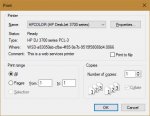
Been using ProScan's FL Editor with my BCD536HP a lot lately since Sentinel currently does not support NXDN. It works great but I was wondering if you could include a "Print Preferences" dialog after selecting "Print" like so many Windows apps have (see below). ProScan apparently defaults to the last printer settings which is not always what is desired.

Thanks
 

Attachments

  • preferences.jpg
    preferences.jpg
    23.6 KB · Views: 227

ProScan

Software Provider
Premium Subscriber
Joined
Jul 2, 2006
Messages
8,441
Reaction score
4,952
Location
Ontario, Calif.
Been using ProScan's FL Editor with my BCD536HP a lot lately since Sentinel currently does not support NXDN. It works great but I was wondering if you could include a "Print Preferences" dialog after selecting "Print" like so many Windows apps have (see below). ProScan apparently defaults to the last printer settings which is not always what is desired.

Thanks

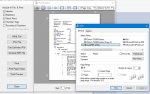
Like this? Click the Print Preview button to select the printer.
 

Attachments

  • Printer Dialog.jpg
    Printer Dialog.jpg
    54.7 KB · Views: 221
Top