ProScan

Software Provider
Premium Subscriber
Joined
Jul 2, 2006
Messages
8,331
Reaction score
4,751
Location
Ontario, Calif.
ProScan Version 1.7 Build 2 includes the RadioReference Imports feature, improved Scanner Over IP, and bug fixes.

Supported scanners are the BCD996T, BC796D, BC785D, BC780XLT, BC296D, and the BC250D.

I'm thriving to make this the best Computer Aided Scanning program and suggestions are very much appreciated.

http://www.proscan.org/index.htm

Bob
 

ProScan

Software Provider
Premium Subscriber
Joined
Jul 2, 2006
Messages
8,331
Reaction score
4,751
Location
Ontario, Calif.
It seems this could be done at either the HP-based export level or during the import and would also apply to System and Group names. But it would be best left up to you to figure out.

I decided not to renew my premium subscription after 10 years, losing the ability to update my non-HP based scanners, and were it not for Uniden's weekly HP updates and your import from hpe feature, I would be in trouble because there's no other way to do it that I'm aware of. Glad I at least have ProScan for the Uniden's but have nothing for the Radio Shacks.

It's a great feature and selling point for those in my situation, but the long alpha tags are a pain to deal with when going backwards.
I may look at this down the road. No guarantees.
Bug Reporting and Suggestions

{edit}
But it would be best left up to you to figure out.
If you can't come up with anything to shorten the text tags then I suspect it's not an easy problem to solve.
 
Last edited:

ProScan

Software Provider
Premium Subscriber
Joined
Jul 2, 2006
Messages
8,331
Reaction score
4,751
Location
Ontario, Calif.
It seems this could be done at either the HP-based export level or during the import
I'm thinking of a process that pulls all the text tags from the source and puts them in a tab delimited file that can be edited before the import
 

4436time

Member
Premium Subscriber
Joined
Dec 18, 2009
Messages
328
Reaction score
83
Location
Colorado
That might work. Need a way to globally strip out spaces and perhaps vowels, and to abbreviate. I will submit the suggestion soon.

I'm thinking of a process that pulls all the text tags from the source and puts them in a tab delimited file that can be edited before the import
 

wizzardproduction

Member
Premium Subscriber
Joined
Feb 3, 2014
Messages
156
Reaction score
31
Location
Puerto Rico
well iam wandering what iam doing wrong ive made my channel list using radio reference and organized everything including my search banks and everytime i download to scanner it says its doing it channel by channel bank by bank but all it does is erase all the channels from the program and delete everything from the scanner what am i doing wrong ?......by the way iam using a Uniden BC 780XLT anybody have any ideas ???thanks
73s
kc5fws
Monte
214-206-7949
 

ProScan

Software Provider
Premium Subscriber
Joined
Jul 2, 2006
Messages
8,331
Reaction score
4,751
Location
Ontario, Calif.
well iam wandering what iam doing wrong ive made my channel list using radio reference and organized everything including my search banks and everytime i download to scanner it says its doing it channel by channel bank by bank but all it does is erase all the channels from the program and delete everything from the scanner what am i doing wrong ?......by the way iam using a Uniden BC 780XLT anybody have any ideas ???thanks
73s
kc5fws
Monte
214-206-7949
You want to do a Upload To Scanner and not Download From Scanner.
 

wizzardproduction

Member
Premium Subscriber
Joined
Feb 3, 2014
Messages
156
Reaction score
31
Location
Puerto Rico
well that what i thought i was doing but will try again lol .....and i will report back i onlu saw 1 place to either as the button says .....upload and the button bellow it says download ....it didnt give options other than that .......

i think iam used to uploading to the computer from the radio and .......downloading from the computer to the radio lol so i guess this is backward from kenwood ill learn this program yet lol thanks
 

ProScan

Software Provider
Premium Subscriber
Joined
Jul 2, 2006
Messages
8,331
Reaction score
4,751
Location
Ontario, Calif.
well that what i thought i was doing but will try again lol .....and i will report back i onlu saw 1 place to either as the button says .....upload and the button bellow it says download ....it didnt give options other than that .......

i think iam used to uploading to the computer from the radio and .......downloading from the computer to the radio lol so i guess this is backward from kenwood ill learn this program yet lol thanks

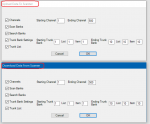
I see now. It's all relative. "uploading to the computer from the radio". Kenwood and ProScan are both correct. I stand by my terminology.

This was brought up once before.

You should of seen one of these dialogs. The key words are To & From
Untitled.png
 

BKTP

Retired Firefighter / Slumlord
Joined
Jan 12, 2018
Messages
19
Reaction score
26
Ok, please forgive me for not searching all 307 pages here, but can one install proscan and setup webserver then access it from a android phone. (I'm sure this info is buried somewhere in this thread? 😳
 

fxdscon

¯\_(ツ)_/¯
Premium Subscriber
Joined
Jan 15, 2007
Messages
7,597
Reaction score
3,793
Ok, please forgive me for not searching all 307 pages here, but can one install proscan and setup webserver then access it from a android phone. (I'm sure this info is buried somewhere in this thread? 😳
Yes, works just fine on any web browser, including control. Which scanner are you using? The list of supported scanners for the webserver is on the left side of this page under the "Proscan" header:

 
Last edited:

BKTP

Retired Firefighter / Slumlord
Joined
Jan 12, 2018
Messages
19
Reaction score
26
Thank you, back to reading through the info here. Will get this as soon as my SDS arrives. USPS is playing checkers with it.
 

Patch42

Member
Joined
Feb 14, 2008
Messages
372
Reaction score
145
The key words are To & From
Perhaps if "Upload/Download" were replaced with "Transfer", it would more make more obvious the dependence on "to/from" to indicate direction. I've long found upload/download to be terms loaded with confusion because they imply a hierarchical relationship that's often not at all obvious.
 

Patch42

Member
Joined
Feb 14, 2008
Messages
372
Reaction score
145
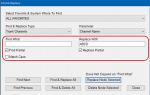
Question on Find & Replace -- Is there a way to insert a string at the beginning of each of a group of fields? What I'm looking for is equivalent to what regex "s/^/xyx/" would do. When I do a Find on "^" it comes back as none found so clearly "^" doesn't indicate beginning of line.
 

ProScan

Software Provider
Premium Subscriber
Joined
Jul 2, 2006
Messages
8,331
Reaction score
4,751
Location
Ontario, Calif.
Question on Find & Replace -- Is there a way to insert a string at the beginning of each of a group of fields? What I'm looking for is equivalent to what regex "s/^/xyx/" would do. When I do a Find on "^" it comes back as none found so clearly "^" doesn't indicate beginning of line.
I don't believe regex works with Find & Replace.
 

Patch42

Member
Joined
Feb 14, 2008
Messages
372
Reaction score
145
I don't believe regex works with Find & Replace.
I kind of figured that since "^" didn't work, but I was wondering if maybe there was another way to insert something at the start of each channel name. I often find when quickly glancing at the scanner that what's in the channel name portion of the display isn't enough to fully identify the channel. The other qualifying information is there, but in other areas of the screen. It takes my old eyes long enough to focus on the display that often the scanner has moved on before I'm able to read all the information. So I'd like to preface each channel name with an abbreviation of the agency associated with the channel. Being able to insert a string at the beginning of each channel name would make this a lot easier.
 

ProScan

Software Provider
Premium Subscriber
Joined
Jul 2, 2006
Messages
8,331
Reaction score
4,751
Location
Ontario, Calif.
I kind of figured that since "^" didn't work, but I was wondering if maybe there was another way to insert something at the start of each channel name. I often find when quickly glancing at the scanner that what's in the channel name portion of the display isn't enough to fully identify the channel. The other qualifying information is there, but in other areas of the screen. It takes my old eyes long enough to focus on the display that often the scanner has moved on before I'm able to read all the information. So I'd like to preface each channel name with an abbreviation of the agency associated with the channel. Being able to insert a string at the beginning of each channel name would make this a lot easier.
I'm not sure. It's been a while since I was there and in the middle of something now so it will be awhile before I can get to it. If you're hinting at a suggestion. Take a moment to read this. Bug Reporting and Suggestions
 

Patch42

Member
Joined
Feb 14, 2008
Messages
372
Reaction score
145
That worked. Thanks. I had to do them one by one to limit the range (huge system with many agencies), but 'click-click' was still much easier than typing it all by hand.
 

BKTP

Retired Firefighter / Slumlord
Joined
Jan 12, 2018
Messages
19
Reaction score
26
Is there a guide anywhere for a newb of at least upper tier idiot qualifications to help setup Proscan to be able to monitor my SDS100 over the internet on my phone? Im looking but scratching head. Source client, Web Server, Remote scanner over IP??? All? Some? None of these? :)
 
Top