ProScan

Software Provider
Premium Subscriber
Joined
Jul 2, 2006
Messages
8,553
Reaction score
5,101
Location
Ontario, Calif.
ProScan Version 1.7 Build 2 includes the RadioReference Imports feature, improved Scanner Over IP, and bug fixes.

Supported scanners are the BCD996T, BC796D, BC785D, BC780XLT, BC296D, and the BC250D.

I'm thriving to make this the best Computer Aided Scanning program and suggestions are very much appreciated.

http://www.proscan.org/index.htm

Bob
 

Gary333

Member
Joined
Sep 4, 2019
Messages
44
Reaction score
4
We are missing something.

You have been very helpful. Thanks.

Maybe the guys will read this when they get home tonight and realize what we missed.


Thanks again
 

ProScan

Software Provider
Premium Subscriber
Joined
Jul 2, 2006
Messages
8,553
Reaction score
5,101
Location
Ontario, Calif.
Gary333,
One test you could do is re-insert the USB cable then press the "E" key when prompted. If it goes into Mass Storage mode then the cable is probably good.
 

ProScan

Software Provider
Premium Subscriber
Joined
Jul 2, 2006
Messages
8,553
Reaction score
5,101
Location
Ontario, Calif.
I have never been prompted to press the E key.
Okay let's focus on that.

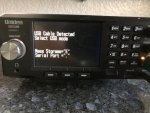
Do this: Re-insert the USB cable in the scanner. After about 2 seconds, you should see a message

USB Cable Detected
Select USB mode

Mass Storage = "E"
Serial Port = "."

Do you see that? If not check the other end is connected. If it is connected, try another USB port. If using a USB hub, connect it directly to the computer for a test.
 

Gary333

Member
Joined
Sep 4, 2019
Messages
44
Reaction score
4
I unplugged and reinserted. I heard the familiar Windows sound that it made contact buy I didn't receive a message on the scanner.
 

ProScan

Software Provider
Premium Subscriber
Joined
Jul 2, 2006
Messages
8,553
Reaction score
5,101
Location
Ontario, Calif.
I unplugged and reinserted. I heard the familiar Windows sound that it made contact buy I didn't receive a message on the scanner.
You should see a message. Can you try another USB port? Is the other end connected to a computer USB port and not a USB hub?

{edit} The message I'm talking about should appear on the actual scanner display and not ProScan.
 

Gary333

Member
Joined
Sep 4, 2019
Messages
44
Reaction score
4
I connected the scanner directly to the computer motherboard.

No message. I turned the scanner off and back on. No message on the actual scanner or virtual scanner
 

ProScan

Software Provider
Premium Subscriber
Joined
Jul 2, 2006
Messages
8,553
Reaction score
5,101
Location
Ontario, Calif.
how do I make sure the scanner is in Serial Port Mode?

It's in Serial Port mode when the scanner is operating normally. However Serial Port mode doesn't mean the data is passing through the serial port. The major symptom I would focus on is you do not see this message in the actual scanner display. Why? That has to be troubleshot

Scanner Display should show this when the USB cable is plugged in
USB Cable Detected
Select USB mode

Mass Storage = "E"
Serial Port = "."
 
Top