FrensicPic

Member
Premium Subscriber
Joined
Jun 16, 2012
Messages
270
Reaction score
157
Location
Los Angeles
How can the other two be unchecked too? One of them has to be checked.
When I opened the upload dialog window to note kruser's comment to me, nothing was checked. I have since played with checking one or the other and now indeed, one of them has to be checked. I'm trying it again wiht Use SQK & GQK Status Grid...
Thanks, John
 

ProScan

Software Provider
Premium Subscriber
Joined
Jul 2, 2006
Messages
8,271
Reaction score
4,648
Location
Ontario, Calif.
When I opened the upload dialog window to note kruser's comment to me, nothing was checked. I have since played with checking one or the other and now indeed, one of them has to be checked. I'm trying it again wiht Use SQK & GQK Status Grid...
Thanks, John
If none of the boxes are checked then it's equivalent to the option "Don't Upload SQKs and GQKs". And by not uploading the SQKs and GQKs, the SQKs should stay the same, either off or on. The problem is the GQKs. Uniden uses what's called "system index" to link the systems to the GQKs. If the option "Delete All Systems In The Scanner..." is set then the system indexes will change and therefore the GQKs will all be off. The scanner is doing that. Use the option "Use SQKs and & GQK Status Grid..." so it will be like it was before.

{edit} It's interesting (to me anyways) that on the BCDx36HP and SDSx00 Favorites, Uniden changed the way that the GQKs are linked to the systems. It was changed so that the GQK data are part of the system data and not separate like in the DMA models.
 
Last edited:

FrensicPic

Member
Premium Subscriber
Joined
Jun 16, 2012
Messages
270
Reaction score
157
Location
Los Angeles
If none of the boxes are checked then it's equivalent to the option "Don't Upload SQKs and GQKs". And by not uploading the SQKs and GQKs, the SQKs should stay the same, either off or on. The problem is the GQKs. Uniden uses what's called "system index" to link the systems to the GQKs. If the option "Delete All Systems In The Scanner..." is set then the system indexes will change and therefore the GQKs will all be off. The scanner is doing that. Use the option "Use SQKs and & GQK Status Grid..." so it will be like it was before.

{edit} It's interesting (to me anyways) that on the BCDx36HP and SDSx00 Favorites, Uniden changed the way that the GQKs are linked to the systems. It was changed so that the GQK data are part of the system data and not separate like in the DMA models.
Thanks. I re-uploaded and selected "Use SQKs and & GQK Status Grid..." this time. All is good now. Thanks.
 

Nchpiboy

Member
Premium Subscriber
Joined
Jul 7, 2018
Messages
209
Reaction score
114
Location
Hayesville, NC
Issue with 19.1 version:
When I choose the upload to scanner option the window is larger than my screen and I am unable to access the control buttons at the bottom of the screen. the window` has no scroll bars and no way to exit the window. I must use task manager to close the program. I believe its related to my` screen resolution of my Netbook which is 1024x600.
 

ProScan

Software Provider
Premium Subscriber
Joined
Jul 2, 2006
Messages
8,271
Reaction score
4,648
Location
Ontario, Calif.
Issue with 19.1 version:
When I choose the upload to scanner option the window is larger than my screen and I am unable to access the control buttons at the bottom of the screen. the window` has no scroll bars and no way to exit the window. I must use task manager to close the program. I believe its related to my` screen resolution of my Netbook which is 1024x600.
I'll look at it before the next release.
 

pferama

Member
Feed Provider
Joined
Jun 8, 2018
Messages
23
Reaction score
5
Location
Seattle
I'll look at it before the next release.

Just FYI, looks like MalwareBytes is flagging the 19.1.exe (setup file) as false positive when I try to run it. (I see in this thread that happened in years past and MalwareBytes updated signature list to resolve it. After restoring from quarantine, the install and software works just fine.
 

Attachments

  • mbam_Z3FKlnat6C.png
    mbam_Z3FKlnat6C.png
    12 KB · Views: 15

Chris0516

Active Member
Joined
Feb 22, 2020
Messages
1,572
Reaction score
362
Location
Pittsboro, North Carolina
Just FYI, looks like MalwareBytes is flagging the 19.1.exe (setup file) as false positive when I try to run it. (I see in this thread that happened in years past and MalwareBytes updated signature list to resolve it. After restoring from quarantine, the install and software works just fine.
Hmmm....I didn't have that problem.
 

pferama

Member
Feed Provider
Joined
Jun 8, 2018
Messages
23
Reaction score
5
Location
Seattle
Don't know if any different, but I have the paid subscription MalwareBytes realtime protection stuff running on this machine.
 

johntodd

Newbie
Premium Subscriber
Joined
Jul 22, 2006
Messages
24
Reaction score
4
Location
Rio Linda, California
Using my SDS100, I'm suddenly not getting any audio out of ProScan after the update. I get data on the display, but absolutely no scanner audio no matter what I do. I read the docs, but I don't see an audio setup "checklist" or tutorial there. Help?
 

ProScan

Software Provider
Premium Subscriber
Joined
Jul 2, 2006
Messages
8,271
Reaction score
4,648
Location
Ontario, Calif.
Using my SDS100, I'm suddenly not getting any audio out of ProScan after the update. I get data on the display, but absolutely no scanner audio no matter what I do. I read the docs, but I don't see an audio setup "checklist" or tutorial there. Help?
Could it be your Internet Security or Antivirus software is blocking the connection? Try to temporarily disable it and see if that will work or add an exemption to your Antivirus software.
 

johntodd

Newbie
Premium Subscriber
Joined
Jul 22, 2006
Messages
24
Reaction score
4
Location
Rio Linda, California
Could it be your Internet Security or Antivirus software is blocking the connection? Try to temporarily disable it and see if that will work or add an exemption to your Antivirus software.
Good morning.

I've disabled my Windows firewall and I don't run an anti-virus or anti-malware app. No matter what I do, I cannot get a peep out of ProScan. I'm going to put my 536 on it to see if that makes a difference. Will report back.
 

johntodd

Newbie
Premium Subscriber
Joined
Jul 22, 2006
Messages
24
Reaction score
4
Location
Rio Linda, California
Issue is the same with BCD536HP. No audio from ProScan no matter what I do.

I tuned to NWS and tried each capture audio service with no joy. I get tone on capture side with loopback enabled. I get tone on playback side with and without loopback. However, significant feedback loop on playback side with loopback enabled. Nothing on audio scope using Primary Sound Capture device as input sound device.

I'm lost.
 

ProScan

Software Provider
Premium Subscriber
Joined
Jul 2, 2006
Messages
8,271
Reaction score
4,648
Location
Ontario, Calif.
Issue is the same with BCD536HP. No audio from ProScan no matter what I do.

I tuned to NWS and tried each capture audio service with no joy. I get tone on capture side with loopback enabled. I get tone on playback side with and without loopback. However, significant feedback loop on playback side with loopback enabled. Nothing on audio scope using Primary Sound Capture device as input sound device.

I'm lost.
You could always revert back to the version that worked before. If it works then I would triple check your Internet Security/Antivirus software.
I seen a few times that after 5 or 10 times of checking. "Oh I forgot I had this running..."

{edit} I just reread this. I was thinking you were using the SDS200 LAN and now the BCD536HP WiFi. I see you are using the Sound card. In that case, nothing to do with antivirus software.
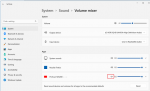
Try to determine if the problem is on the input side or output. If on the input then go to the privacy & microphone settings. If on the output side then go to the Volume Mixer settings and ensure ProScan is enabled and not muted like in these images.

Untitled.png
Volume Mixer.png
 
Last edited:

Nascar18

Member
Premium Subscriber
Joined
Mar 3, 2005
Messages
435
Reaction score
144
Location
Southeast Massachusetts
Pro Scan support,
I just noticed on my R.I. RISCON 800 mhz Phase I system. They have 4 zones and I noticed when using ProScan there is a Band Plan button. Three of the zones have under Band Plan 0, Base: 851.00625, Spacing 6.250. Band Plan 1, 762.00625, Spacing: 6.250. One of the zones has nothing filled in with the Band Plan. My question is should there be any Band Plan filled in?
 

ProScan

Software Provider
Premium Subscriber
Joined
Jul 2, 2006
Messages
8,271
Reaction score
4,648
Location
Ontario, Calif.
Pro Scan support,
I just noticed on my R.I. RISCON 800 mhz Phase I system. They have 4 zones and I noticed when using ProScan there is a Band Plan button. Three of the zones have under Band Plan 0, Base: 851.00625, Spacing 6.250. Band Plan 1, 762.00625, Spacing: 6.250. One of the zones has nothing filled in with the Band Plan. My question is should there be any Band Plan filled in?
That's more of a system question then a ProScan question. Check the RRDB if shows BP 3 info.
 

pferama

Member
Feed Provider
Joined
Jun 8, 2018
Messages
23
Reaction score
5
Location
Seattle
You could always revert back to the version that worked before. If it works then I would triple check your Internet Security/Antivirus software.
I seen a few times that after 5 or 10 times of checking. "Oh I forgot I had this running..."

I'm also using SDS100 with ProScan, no issue with audio when updating to ProScan 19.1. (I haven't messed with setup/settings in years I think so I'm not fresh on details, but these are the settings I've been using forever).

In case it helps, I have ProScan recording set up to record, skipping silence, all the time. But when I'm not listening live, I type "App Sound" in Windows search bar and open "Sound Mixer Options" then mute/unmute the ProScan app audio output (to speakers) there. So make sure ProScan isn't muted.
ApplicationFrameHost_kbetBp8iG0.png

ProScan
ProScan_lTJTwbSJcL.png

ProScan_PypCrXL8lm.png
 

Chris0516

Active Member
Joined
Feb 22, 2020
Messages
1,572
Reaction score
362
Location
Pittsboro, North Carolina
Bob, How can I fix the graphics look in Proscan? I don't mean something like, trying to mess with the code. I mean I had a seizure and messed up borders for the individual items. So, Now they don't have borders, and have 'v' arrow to click. I want to set it back to the way it was.

1648501235264.png
 

GTR8000

NY/NJ Database Guy
Database Admin
Joined
Oct 4, 2007
Messages
16,622
Reaction score
15,428
Location
BEE00
That screenshot looks perfectly normal to me, not sure what you think it should look like.
 

GTR8000

NY/NJ Database Guy
Database Admin
Joined
Oct 4, 2007
Messages
16,622
Reaction score
15,428
Location
BEE00
Are you talking about all the fields listed on that tab in your screenshot? The "v" is always there, that's an indicator showing there are drop-down selections available. I see borders around the fields in your screenshot. Doesn't look any different from the 996P2 database I have open in ProScan 19 on my PC right now.
 
Top