ProScan

Software Provider
Premium Subscriber
Joined
Jul 2, 2006
Messages
8,403
Reaction score
4,863
Location
Ontario, Calif.
ProScan Version 1.7 Build 2 includes the RadioReference Imports feature, improved Scanner Over IP, and bug fixes.

Supported scanners are the BCD996T, BC796D, BC785D, BC780XLT, BC296D, and the BC250D.

I'm thriving to make this the best Computer Aided Scanning program and suggestions are very much appreciated.

http://www.proscan.org/index.htm

Bob
 

SaSal

Member
Joined
Jan 8, 2018
Messages
18
Reaction score
4
Gotta say, Outstanding bit of software.
Undertaking a new scanning station that will also be casting, few SDS200's and around 6 or so SDR's ; for managing the SDS's Proscan just makes quality of life simple. End goal - what I really want, would be for Proscan to be the recording /archiving and streaming solution across both SDS's and SDR's, will update as things progress, but just wanted to again say how nice it is to use a mature-stable and easy to use bit of kit, great job.
 

W8WCA

Member
Joined
Jun 1, 2005
Messages
740
Reaction score
506
Location
/usa/oh/cmh EM89kx
Can I use the Remote Control Over IP to just stream the SDS200 audio?

It does not have the delay the web server does.

I want to listen to my scanner from my Note 8 or my iPhone 8

I tried it using Custom Radio Player app on Android and does not connect

Probably not setup to but wanted to ask
 

ProScan

Software Provider
Premium Subscriber
Joined
Jul 2, 2006
Messages
8,403
Reaction score
4,863
Location
Ontario, Calif.
Can I use the Remote Control Over IP to just stream the SDS200 audio?

It does not have the delay the web server does.

I want to listen to my scanner from my Note 8 or my iPhone 8

I tried it using Custom Radio Player app on Android and does not connect

Probably not setup to but wanted to ask
The RSOIP (Remote Scanner Over IP) feature requires ProScan RSOIP in client mode or the Free ProScan Client at the far end so it will not work on mobile devices.

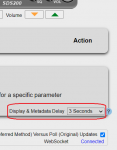
The Web Server feature latency is produced by the media player network buffer. If using the Web Server, you may want to try using a different media player with reduced latency. WinAmp (WIn OS flavor) latency is around 3 seconds. There's also an option on the web page "Metadata Delay". That will delay the web page display and text tags so the audio will appear in sync.
 
Last edited:

W8WCA

Member
Joined
Jun 1, 2005
Messages
740
Reaction score
506
Location
/usa/oh/cmh EM89kx
The RSOIP (Remote Scanner Over IP) feature requires ProScan RSOIP in client mode or the Free ProScan Client at the far end so it will not work on mobile devices.

The Web Server feature latency is produced by the media player network buffer. If using the Web Server, you may want to try using a different media player with reduced latency. WinAmp (WIn OS flavor) latency is around 3 seconds. There's also an option on the web page "Metadata Delay". That will delay the web page display and text tags so the audio will appear in sync.

I am not seeing the MetaData delay n the Web Server Tab area.

Maybe I am missing it?

86815
 

gcopter1

Member
Joined
Mar 1, 2014
Messages
902
Reaction score
165
Location
Winter Park, Florida
I'm trying to understand PS and how it handles logging, specifically, RSSI readings.
While there's traffic, RSSI readings fluctuate. When the transmission is over, PS records the highest reading.

Is there a way for PS to as an alternative, record the lowest RSSI?

I'm trying to determine the best filter/squelch combination when receiving a particular system.

As of now, I'm making a list of the lowest RSSI readings, with varying filters and squelch settings.

I'm monitoring a P25 simulcast system.

I'm making a list, and writing down, the results.

However, I'm bothered by not knowing how either the radio or PS, handles this data.

I feel that, in this endeavor, digital errors also plays a role, but, PS, doesn't have this feature. Maybe it is not important, maybe the radio itself does not allow the software to record this, maybe I'm looking at this the wrong way and instead, should focus on the RSSI readings.

I'm using an SDS 200.

Your thoughts and opinions, welcome.
 

ProScan

Software Provider
Premium Subscriber
Joined
Jul 2, 2006
Messages
8,403
Reaction score
4,863
Location
Ontario, Calif.
I get what you say, but, as I'm monitoring in real time, I see the RSSi fluctuate to lower numbers than PS records. At the end of the transmission, that's where I see PS record the highest number overall.
You can compare the RSSI values received from the scanner. Go to the Test & Extra tab and look for the Rssi= property. Another way is go to the Options -> General tab then check the option "Scanner Data To Scanner Data.txt File" box then look at the Scanner Data.txt file.
 

GTR8000

NY/NJ Database Guy
Database Admin
Joined
Oct 4, 2007
Messages
16,853
Reaction score
16,088
Location
BEE00
I get what you say, but, as I'm monitoring in real time, I see the RSSi fluctuate to lower numbers than PS records. At the end of the transmission, that's where I see PS record the highest number overall.
ProScan records the very last RSSI value before the transmission ends, not the "highest" observed. Understand that what ProScan is doing is simply logging the info that comes across the connection to the scanner in real time, which is observable by watching the Test & Extras screen. Nothing more, nothing less.
 

gcopter1

Member
Joined
Mar 1, 2014
Messages
902
Reaction score
165
Location
Winter Park, Florida
You can compare the RSSI values received from the scanner. Go to the Test & Extra tab and look for the Rssi= property. Another way is go to the Options -> General tab then check the option "Scanner Data To Scanner Data.txt File" box then look at the Scanner Data.txt file.
Is the RSSI= Property a protocol command?
 
Top