ProScan

Software Provider
Premium Subscriber
Joined
Jul 2, 2006
Messages
8,465
Reaction score
4,996
Location
Ontario, Calif.
ProScan Version 1.7 Build 2 includes the RadioReference Imports feature, improved Scanner Over IP, and bug fixes.

Supported scanners are the BCD996T, BC796D, BC785D, BC780XLT, BC296D, and the BC250D.

I'm thriving to make this the best Computer Aided Scanning program and suggestions are very much appreciated.

http://www.proscan.org/index.htm

Bob
 

ProScan

Software Provider
Premium Subscriber
Joined
Jul 2, 2006
Messages
8,465
Reaction score
4,996
Location
Ontario, Calif.
yes, but still showing not secure when my browser goes to the site.
I have also used my no-ip on my iphone and windows laptop and still giving me unsecure in the web address line
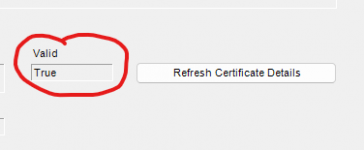
If you use https, does it show secured.
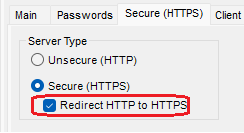
Did you check the 'Redirect HTTP to HTTPS' box? Restart the Web Server after you check the box.
 
Last edited:

thekoos

Newbie
Premium Subscriber
Joined
Sep 27, 2008
Messages
1
Reaction score
0
I cannot access the ProScan home web page at all on any platform, browser or computer I own. I can access sub pages assuming I know what they are. As an example "ProScan" works just fine. And yes https or not makes not difference...

1705420848276.png
 

scottct1

Member
Feed Provider
Joined
Feb 21, 2005
Messages
151
Reaction score
41
Location
Newington, Connecticut
Getting a 404 here as well.

I like to have my machines reboot once a week, is there any way to have it so when ProScan restarts that it automatically restarts the WebServer and Recording as well?

Thanks!
 

fxdscon

¯\_(ツ)_/¯
Premium Subscriber
Joined
Jan 15, 2007
Messages
7,626
Reaction score
3,864
I'm having to replace my computer and trying to re-download Proscan but I get the 404 error page. Have used Chrome and Edge.
Try this link:


Kelita

Member
Joined
Jul 18, 2010
Messages
42
Reaction score
5
Location
Tucson, AZ
Try this link:

THANK YOU!!! (y)
 

ProScan

Software Provider
Premium Subscriber
Joined
Jul 2, 2006
Messages
8,465
Reaction score
4,996
Location
Ontario, Calif.
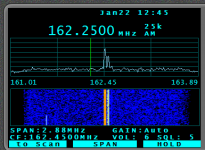
Here's the 1st look at the Waterfall support. It's still in alpha but seems to work nicely. I just need to do some work on the y-axis scaling and read the colors from the Sentinel profile.cfg file.

Unzip and copy the files over the originals. Stop ProScan 1st.


Untitled.png
 

KC1UA

This ain't gettin us noplace, we'll have to blast!
Database Admin
Joined
Oct 27, 2002
Messages
2,332
Reaction score
1,329
Location
Marstons Mills, Cape Cod, Massachusetts
Works well and pretty smooth with the SDS200 and the USB connection. I expected it might need the LAN connection for the 200 to maximize performance.

Now, I'm going to be "that guy" for a moment (apologies in advance).

Is there any chance, or is it even feasible, that this could develop into a larger screen "point, click, and tune" kind of thing? That would be beyond outstanding.

I realize it's early alpha and I do realize that I can resize the screen when in display only mode.

Thanks for adding this. Lots of potential.
 

bravo14

Member
Premium Subscriber
Joined
Feb 18, 2005
Messages
5,507
Reaction score
691
Location
Polk County FL
I had a question on Quick Key Status? I was making a local FL and and have some surrounding counties in. Say if I want to select certain QK in proscan I don't have to go on scanner and deselect qk I don't need to scan. Is there something I missed? I looked everywhere for that section.
 

ProScan

Software Provider
Premium Subscriber
Joined
Jul 2, 2006
Messages
8,465
Reaction score
4,996
Location
Ontario, Calif.
I had a question on Quick Key Status? I was making a local FL and and have some surrounding counties in. Say if I want to select certain QK in proscan I don't have to go on scanner and deselect qk I don't need to scan. Is there something I missed? I looked everywhere for that section.
Correct. Write to the scanner for the changes to take effect. If you want to enable or disable a certain sys/dept./site on the fly then you need to use the scanner keypad. This is from the Sentinel (Easier to Read) BCD436/536HP Manual.

System Quick Keys Status Tab This is where you enable your System Quick Keys. Same function as "Set Scan Selection > Manage Quick Key Status > System Quick Key" in the scanner.

Dept/Site Quick Keys Status Tab
This is where you enable your Department and Site Quick Keys.
 
Top